
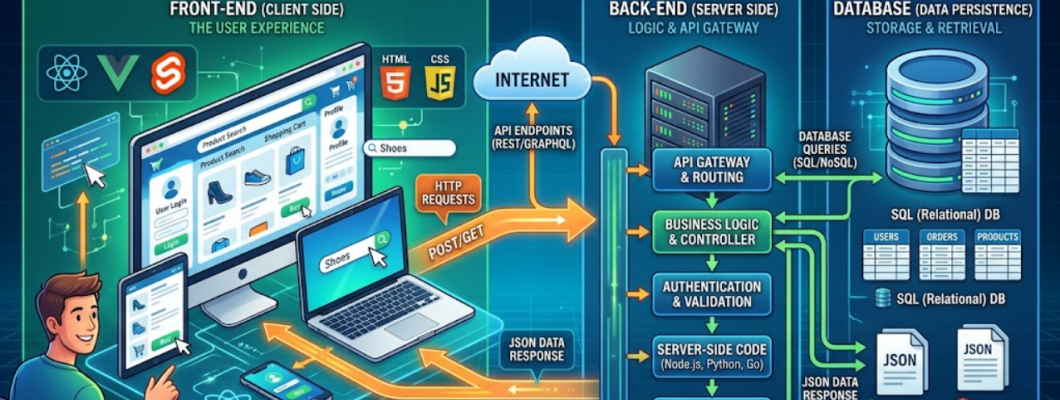
Every time you visit a website, click a button, or submit a form, a sophisticated system operates behind the scenes to ensure a fast and seamless experience. From the user interface (UI) you see and interact with to the database that stores and manages information, modern websites depend on the smooth integration of front-end and back-end development.
The front-end handles design, layout, and user interactions, while the back-end manages data processing, server logic, and database communication. Together, these layers work in sync to deliver functionality, speed, and reliability.
Understanding how these components connect from the visual elements on your screen to the systems handling data in the background is essential for anyone interested in web development, digital products, or scalable applications. This guide explores the complete journey from UI to database, showing how front-end and back-end technologies collaborate to power efficient, user-friendly websites.
What is the Front-End (UI Layer)?
The front-end, also known as the user interface, is the part of a website that users directly interact with. It includes everything you see on your screen text, images, buttons, forms, and navigation menus.
Key Responsibilities:
Designing visually appealing layouts
Ensuring responsive design across devices
Creating interactive elements
Enhancing user experience (UX)
Core Technologies:
HTML – Structures the content
CSS – Styles the appearance
JavaScript – Adds interactivity
Popular Frameworks:
React
Angular
Vue.js
The front-end focuses on making websites intuitive, fast, and engaging for users.
What is the Back-End (Server Layer)?
The back-end is the engine that powers the website behind the scenes. It manages data, processes requests, and ensures everything runs smoothly.
Key Responsibilities:
Handling server logic
Managing databases
Processing user requests
Implementing authentication and security
Common Technologies:
Languages: Python, Java, PHP, Node.js
Databases: MySQL, MongoDB, PostgreSQL
Servers: Apache, Nginx
While users don’t see the back-end, it plays a crucial role in delivering functionality and performance.
The Journey: From UI to Database
To understand how front-end and back-end work together, let’s follow a simple example submitting a login form.
Step-by-Step Process:
User Interaction (Front-End):
The user enters login credentials into a form.
Request Sent to Server:
The front-end sends this data to the back-end via an API.
Server Processing (Back-End):
The server verifies the credentials.
Database Interaction:
The back-end checks the database for matching user data.
Response Returned:
The server sends a success or error message back to the front-end.
UI Update:
The front-end displays the result to the user.
This entire process happens in seconds, creating a seamless experience.
Understanding Databases
A database is where all the application’s data is stored, organized, and managed.
Types of Databases:
1. Relational Databases
Structured data in tables
Examples: MySQL, PostgreSQL
2. NoSQL Databases
Flexible data storage
Examples: MongoDB, Firebase
Key Functions:
Storing user information
Managing application data
Ensuring data consistency and security
Databases are essential for dynamic websites that require real-time data handling.
The Role of APIs in Communication
APIs (Application Programming Interfaces) act as the bridge between front-end and back-end.
Why APIs Are Important:
Enable data exchange
Allow modular development
Support integration with third-party services
Types of APIs:
REST APIs
GraphQL APIs
APIs ensure that the front-end can request and receive data without needing to understand the back-end logic.
Performance Optimization Across Layers
To deliver a fast and smooth user experience, both front-end and back-end must be optimized.
Front-End Optimization:
Minimize file sizes (CSS, JavaScript)
Use lazy loading for images
Optimize rendering speed
Back-End Optimization:
Efficient database queries
Use caching mechanisms
Load balancing for high traffic
Performance optimization ensures quick load times and better user satisfaction.
Responsive and User-Friendly Design
Modern users access websites on multiple devices, making responsiveness essential.
Front-End Role:
Mobile-first design
Adaptive layouts
Smooth navigation
Back-End Role:
Deliver optimized data
Support scalable infrastructure
Together, they ensure consistency across all devices.
Security from UI to Database
Security is a shared responsibility across all layers of a web application.
Front-End Security:
Input validation
Preventing cross-site scripting (XSS)
Secure API requests
Back-End Security:
Data encryption
Authentication and authorization
Protection against SQL injection
Database Security:
Access control
Data backups
Encryption at rest
A secure system protects both user data and application integrity.
Modern Web Architecture
1. Monolithic Architecture
All components are tightly integrated into a single system.
2. Microservices Architecture
Applications are divided into smaller, independent services.
3. Serverless Architecture
Developers build applications without managing servers.
4. Jamstack
Separates front-end from back-end using APIs and static files.
These architectures define how front-end and back-end interact efficiently.
Tools That Power Development
Front-End Tools:
VS Code
Chrome DevTools
Tailwind CSS
Back-End Tools:
Node.js
Django
Spring Boot
Database Tools:
MySQL Workbench
MongoDB Compass
Integration Tools:
Postman
Git & GitHub
Docker
These tools help developers build, test, and deploy applications effectively.
Trends in Modern Web Development (2026)
1. AI-Driven Interfaces
Personalized user experiences powered by AI.
2. API-First Development
Building applications around APIs for flexibility.
3. Cloud-Native Applications
Scalable solutions using cloud infrastructure.
4. Headless CMS
Separates content from presentation.
5. Real-Time Applications
Live updates using WebSockets and streaming technologies.
These trends continue to shape the future of web development.
Career Opportunities
Understanding the flow from UI to database opens up multiple career paths.
Popular Roles:
Front-End Developer
Back-End Developer
Full-Stack Developer
Web Application Developer
Database Administrator
Skills in Demand:
JavaScript frameworks
API development
Database management
Cloud computing
The demand for skilled developers continues to grow globally.
Building a Simple Project
To understand the full process, try building a basic application.
Example: Contact Form
Front-End:
Create a form with HTML and CSS
Add validation using JavaScript
Back-End:
Build an API to receive form data
Process and store data
Database:
Save user submissions
Integration:
Connect front-end with back-end
Display success messages
This hands-on approach helps you understand how everything works together.
Best Practices
Keep code modular and organized
Use clear API documentation
Optimize performance regularly
Implement strong security measures
Test thoroughly across layers
Following these practices ensures efficient and scalable applications.
Conclusion
From the moment a user interacts with a website to the point where data is stored and retrieved, front-end and back-end development work in perfect harmony. The UI creates engaging experiences, while the back-end ensures functionality, reliability, and security.
Understanding this connection from UI to database empowers developers and businesses to build powerful, scalable, and user-friendly applications. Whether you’re just starting your journey or looking to enhance your skills, mastering this flow is key to success in modern web development.
From clicks to code, and from screens to servers, every part plays a vital role in powering the websites we rely on every day.
Leave a Comment